If your team juggles desk phones, video calls, chat apps, voicemail and file sharing across separate systems, you already understand the problem UCaaS solves. Business communication has become fragmented. UCaaS brings it back into one connected platform.
This guide is for SME owners, IT leads and operations managers who want a clear, practical explanation of Unified Communications as a Service. You will learn what UCaaS is, how it works, what features matter, how it compares with older phone systems, and how to choose the right provider.
Quick answer: UCaaS is a cloud-based communications platform that combines voice calls, video meetings, instant messaging, voicemail, collaboration tools and mobility into one subscription service. It is often a strong fit for SMEs that want to replace ageing phone systems, support hybrid working and simplify business communication.
If your current setup is still built around separate tools, Digital Exchange can help you review VoIP telephone systems, business broadband and cloud-based communication options.
What Is UCaaS?
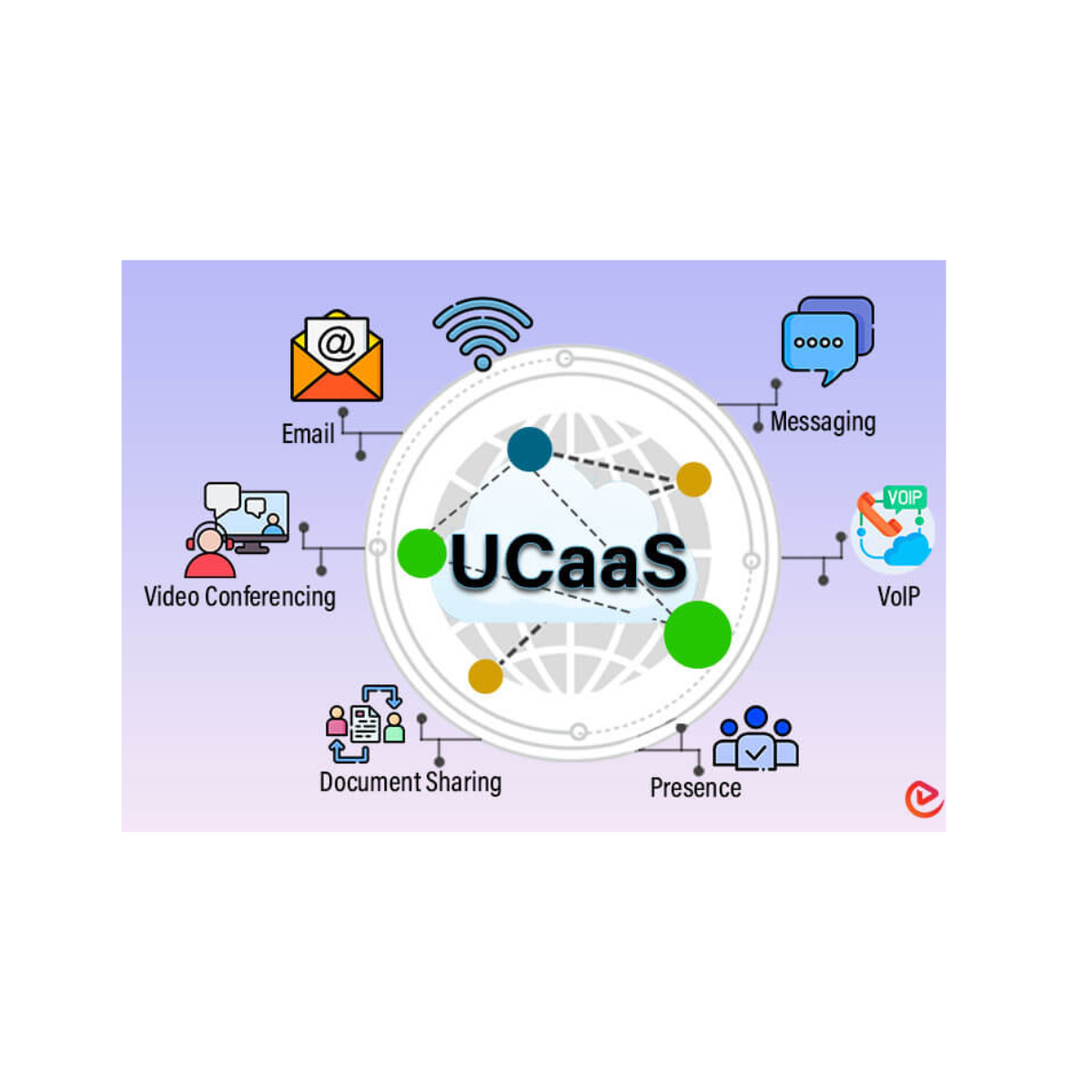
UCaaS stands for Unified Communications as a Service. It means your communication tools are delivered through the cloud rather than through on-site phone hardware or separate disconnected apps.
A UCaaS platform usually combines:
- Business phone calls
- VoIP calling
- Video meetings
- Instant messaging
- Voicemail
- File sharing
- Presence indicators
- Mobile and desktop apps
The goal is simple: your team can communicate from one platform, across multiple devices, without relying on a traditional on-premise phone system.
If you are new to internet-based calling, our guide to cloud-based phone systems explains the foundation behind many UCaaS platforms.
How UCaaS Works
A UCaaS system runs through cloud infrastructure managed by your provider. Instead of buying and maintaining servers or a physical PBX, your business accesses communication tools over the internet.
Cloud-Based Delivery
Your provider hosts the platform, applies updates, manages resilience and maintains the core infrastructure. Your users access the service through desk phones, laptops, mobiles or browser-based apps.
Device And App Access
Staff can make and receive calls from different devices, including:
- IP desk phones
- Laptops
- Desktop computers
- Mobile phones
- Tablets
This makes UCaaS especially useful for hybrid teams, mobile staff and businesses with multiple locations.
Internet Connection Requirements
Because UCaaS runs over the internet, reliable connectivity is essential. Poor broadband can lead to dropped calls, poor audio, frozen video and delayed messages.
If your connection is not performing well, read our guide on why business internet becomes slow or review your options for business broadband in Sheffield.
Core Features Of UCaaS
UCaaS platforms vary, but most include a core set of communication features.
VoIP And Business Phone Features
UCaaS usually includes VoIP calling, allowing your business to make and receive calls over the internet.
Common phone features include:
- Call routing
- Call forwarding
- Voicemail-to-email
- Auto-attendants
- Hunt groups
- Call recording
- Local and national numbers
For more detail on business phone features, see our guide to useful VoIP features.
Video Meetings
UCaaS platforms often include video conferencing tools for internal meetings, client calls, screen sharing and remote collaboration.
Instant Messaging And Presence
Instant messaging gives teams a faster way to communicate than email. Presence indicators show whether a colleague is available, busy, away or offline.
Unified Messaging
Unified messaging brings voicemail, email notifications, call alerts and sometimes SMS into a more centralised view.
Mobility
With mobile apps, staff can make and receive business calls from anywhere while still using the company number. This can be especially useful when combined with business mobile solutions.
UCaaS vs Traditional Phone Systems
Many businesses compare UCaaS with older on-premise phone systems. The biggest difference is where the system lives and how it is managed.
| Factor | Traditional Phone System | UCaaS |
| Hardware | Usually on-site | Cloud-based |
| Upfront cost | Often higher | Usually lower |
| Maintenance | Managed locally or by an engineer | Managed by provider |
| Remote working | Often limited | Built in |
| Scalability | Can require hardware changes | Add or remove users through licences |
| Updates | Manual | Provider-managed |
For many SMEs, UCaaS offers a simpler route to modern communication without the hardware burden of older systems.
UCaaS vs VoIP
VoIP and UCaaS are closely related, but they are not exactly the same.
VoIP refers mainly to making calls over the internet. UCaaS is broader. It usually includes VoIP calling plus video meetings, messaging, collaboration tools, mobility and integrations.
If your business only needs modern calling, a VoIP system may be enough. If you want a joined-up communication platform across voice, video, messaging and mobile users, UCaaS may be the better fit.
You can compare options further in our guide to cost-effective VoIP solutions.
UCaaS vs Contact Centre Software
UCaaS is designed for whole-business communication. Contact centre software is designed for high-volume customer service environments.
UCaaS is usually best for:
- Internal communication
- Business phone calls
- Video meetings
- Team messaging
- Hybrid working
Contact centre software is usually better for:
- Large call queues
- Agent dashboards
- Advanced customer service routing
- High-volume support teams
- Detailed contact centre reporting
Some businesses need both. UCaaS keeps the wider business connected, while contact centre tools support dedicated customer service teams.
When UCaaS Is A Good Fit
UCaaS is particularly useful when your existing communication tools are fragmented, outdated or difficult to manage.
It may be a good fit if:
- Your team works across multiple locations
- You support hybrid or remote working
- You want to replace an ageing phone system
- You need better call routing
- You want one platform for voice, video and messaging
- Your business is growing and needs scalable licences
- You want easier mobile working
Businesses already reviewing the difference between VoIP and Microsoft Teams Calling may also find UCaaS worth considering.
When UCaaS May Not Be The Best Option
UCaaS is powerful, but it is not always necessary.
It may not be the right fit if:
- You only need a very basic phone line
- Your team does not use messaging or video meetings
- Your broadband connection is unreliable
- You are not ready to manage user adoption
- Your existing system is already working well and costs very little
The best choice depends on your communication needs, not just the technology available.
How Much Does UCaaS Cost?
UCaaS pricing usually works on a per-user, per-month subscription model. Costs vary depending on features, call bundles, integrations, support level and number of users.
Typical cost factors include:
- User licences
- Call bundles
- Phone numbers
- Desk phones or headsets
- Call recording
- CRM integration
- Support packages
- Training and setup
To understand related costs, read our guide on how much VoIP costs in the UK.
Benefits Of UCaaS For SMEs
Lower Upfront Costs
UCaaS usually removes the need for large upfront investment in on-site phone hardware.
Easier Scalability
You can add or remove users as your team changes.
Better Hybrid Working
Staff can access calls, messages and meetings from different locations and devices.
Simpler Management
Many admin tasks can be managed through a central portal.
Improved Customer Response
With call routing, presence and mobile access, customers are more likely to reach the right person quickly.
Better Reporting
Call logs, usage reports and analytics can help managers understand communication performance. Our guide to call analytics explains how this data supports better decision-making.
Security And Compliance Considerations
Because UCaaS handles business communication and customer data, security matters.
Before choosing a provider, check:
- Where data is stored
- Whether calls and messages are encrypted
- How user access is controlled
- Whether multi-factor authentication is available
- How incidents are reported
- Whether call recordings are stored securely
- How long data is retained
The National Cyber Security Centre cloud security guidance is a useful external resource when assessing cloud-based services.
Choosing The Right UCaaS Provider
Not all providers offer the same service quality, support or flexibility.
When comparing UCaaS providers, ask:
- What features are included as standard?
- What costs extra?
- Is support UK-based?
- What uptime commitment is offered?
- Does it integrate with your CRM?
- Can you keep your existing numbers?
- How long does migration take?
- What happens if your internet connection fails?
- Can the system scale as your business grows?
If you need to keep existing business numbers, our guide to number porting explains what is involved.
Implementing UCaaS: A Practical Rollout Plan
Step 1: Review Your Current Setup
List your current phone lines, numbers, devices, apps, contracts and call flows.
Step 2: Check Your Internet Connection
Make sure your broadband can support voice, video and messaging reliably. You may need to review business broadband costs or consider stronger connectivity if your current service is unreliable.
Step 3: Define Must-Have Features
Decide whether you need call recording, call routing, mobile apps, voicemail-to-email, CRM integration or reporting.
Step 4: Run A Pilot
Test the platform with a small group before rolling it out company-wide.
Step 5: Train Staff
Adoption matters. Give staff role-specific training so they understand how the new system supports their daily work.
Step 6: Review After Launch
Check call quality, user feedback, missed calls, customer response times and support tickets after the first month.
UCaaS And The Future Of Business Communications
UCaaS is becoming more important as businesses move away from traditional phone lines and towards cloud-based communication.
AI features are also becoming more common, including call summaries, meeting notes, voicemail transcription and performance insights. You can explore this further in our guide to AI in modern business communication systems.
For SMEs, the direction is clear: communication systems are becoming more flexible, more integrated and more data-driven.
UCaaS Checklist For SMEs
- Map your current phone system and communication tools
- Check broadband reliability
- List must-have features
- Confirm number porting requirements
- Review security and compliance controls
- Ask about CRM integration
- Check support quality
- Run a pilot before full rollout
- Train staff properly
- Review performance after launch
Final Thoughts
UCaaS takes separate phone systems, video tools and messaging apps and brings them into one cloud-based communications platform. For SMEs, that can mean lower upfront costs, easier scaling, better hybrid working and a more consistent customer experience.
The right approach is practical. Start with your business needs, check your internet connection, define the features you actually require, then test the system before rolling it out fully.
Speak To Digital Exchange
Digital Exchange helps UK businesses move to smarter, cloud-based communications that keep teams connected and customers easier to reach.
Whether you are replacing an ageing phone system, supporting a hybrid workforce, reviewing VoIP, or comparing UCaaS platforms, our team can assess your needs and recommend the right solution.
Ready to simplify your business communications? Request a quotation or contact Digital Exchange today to discuss your options.