Your business depends on the internet more than ever. Card payments, VoIP phone systems, cloud software, Microsoft 365, CRM platforms and email all rely on a stable connection. So what happens when that connection fails?
For many organisations, the answer is simple — operations stop. Staff cannot work efficiently, customers cannot reach you, and revenue can quickly be affected.
This guide explains what broadband failover is, how automatic failover works, which backup options are available, and how to decide whether your business needs one.
Executive Summary
Internet outages cost businesses far more than most people realise. Lost productivity, interrupted customer service, failed card payments and missed telephone calls all have a direct financial impact.
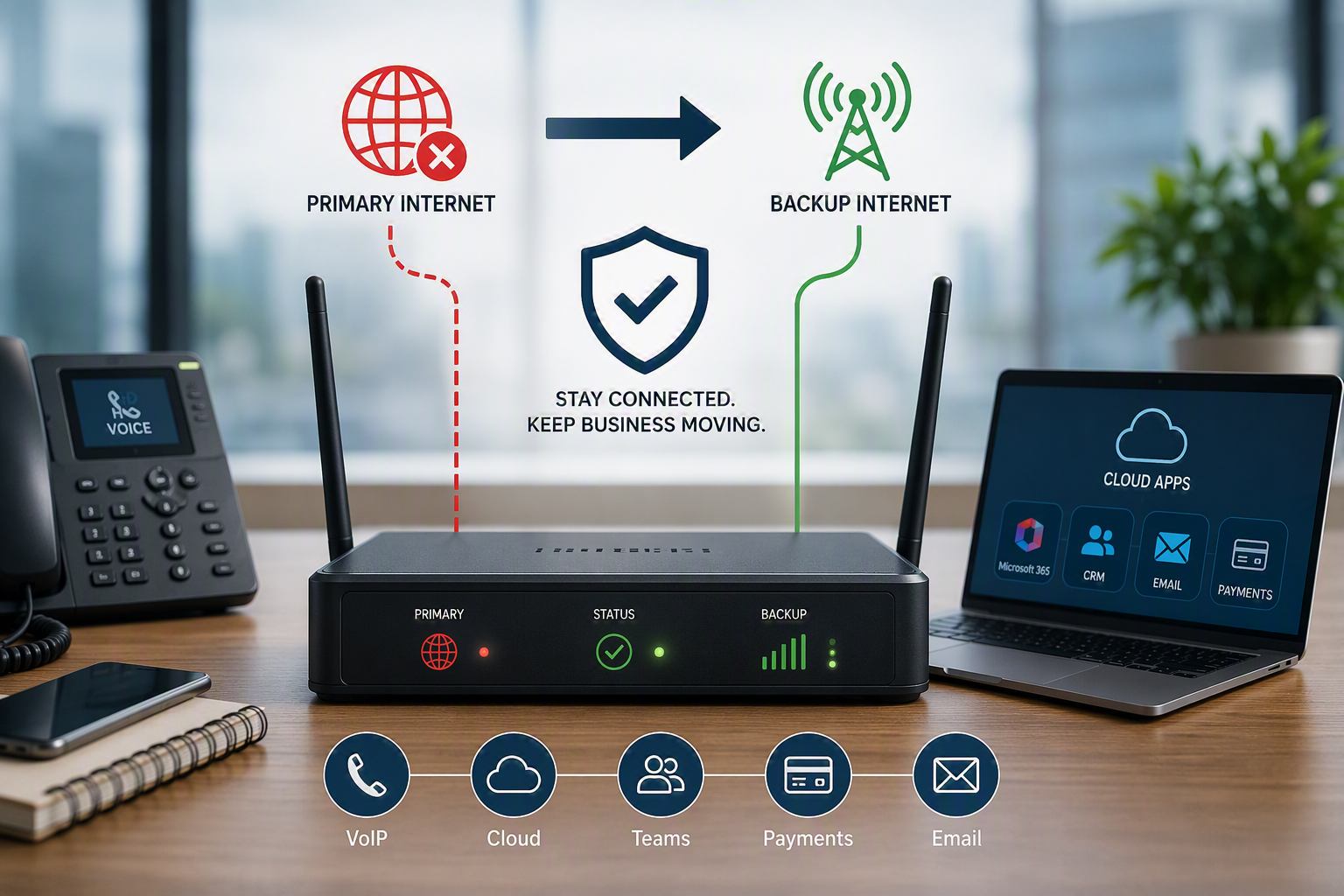
Broadband failover provides an automatic backup connection whenever your primary internet connection fails. Instead of waiting for your provider to restore service, your business continues operating using an alternative connection.
If your business relies on cloud applications, VoIP telephony or online payment systems, broadband failover should be considered part of your business continuity planning.
What Is Broadband Failover?
Broadband failover is a resilience solution that automatically switches your internet traffic to a backup connection whenever your primary broadband service becomes unavailable.
Unlike manually swapping cables or connecting through a mobile hotspot, failover happens automatically. Most users never notice the change.
Broadband failover should not be confused with redundancy.
- Redundancy means having duplicate connections or equipment.
- Failover is the automatic process that moves traffic onto the backup connection when the primary one fails.
Why Broadband Failover Matters
Most UK businesses now depend on continuous connectivity.
Without an internet connection you may lose access to:
- VoIP telephone systems
- Cloud applications
- Microsoft 365
- Payment terminals
- CRM systems
- Remote workers
- Video meetings
If your organisation already uses VoIP telephone systems, maintaining connectivity becomes even more important because your telephone service also depends on your internet connection.
How Automatic Failover Works
Broadband failover follows three simple stages.
1. Continuous Monitoring
Your router constantly checks that your primary internet connection is working correctly.
2. Automatic Switching
If the connection fails, traffic automatically moves to your backup connection without manual intervention.
3. Automatic Recovery
Once your primary service has recovered, traffic switches back automatically.
Most modern business routers complete this entire process within a few seconds.
How Failover Detects Internet Problems
A reliable failover solution constantly monitors the health of your connection.
Typical monitoring includes:
- Internet reachability (Ping testing)
- DNS availability
- Packet loss
- Latency monitoring
Well-configured thresholds prevent unnecessary switching while still reacting quickly to genuine outages.
Broadband Failover Options
4G And 5G Mobile Failover
One of the most popular solutions for SMEs is automatic 4G or 5G failover.
If your fibre connection fails, the router immediately begins using the mobile network.
Advantages include:
- Fast deployment
- Separate network infrastructure
- Affordable monthly costs
- Excellent for VoIP resilience
Secondary Fixed-Line Broadband
Many businesses install a second broadband circuit from another provider.
Using different suppliers reduces the likelihood of both services failing simultaneously.
Dual Leased Lines
Where maximum uptime is essential, two independent leased lines provide enterprise-grade resilience.
This approach is commonly used by businesses that cannot tolerate downtime.
Choosing The Right Broadband Failover Solution
Your failover strategy should match your operational requirements.
- Prioritise business-critical applications
- Choose the right backup technology
- Install business-grade routers with dual WAN capability
- Consider UPS battery backup for networking equipment
If you’re currently reviewing your connectivity, our guide to Business Broadband vs Leased Line explains which connection types are most suitable before adding failover.
Implementation Checklist
- Audit current internet services
- Identify business-critical systems
- Select suitable backup technology
- Configure monitoring rules
- Test automatic failover
- Review annually
Testing Your Failover Solution
Installing failover is only part of the process.
You should regularly disconnect your primary connection to confirm:
- Automatic switching works correctly
- VoIP remains operational
- Cloud applications reconnect correctly
- Users experience minimal disruption
Costs And Return On Investment
Most businesses find broadband failover costs significantly less than even a single hour of downtime.
Calculate:
- Lost sales
- Idle staff costs
- Missed customer enquiries
- Payment failures
- Reputational damage
Compare these figures against the monthly cost of a backup connection and the return on investment often becomes obvious.
Who Should Consider Broadband Failover?
Small Businesses
If you use cloud software, VoIP or card terminals, 4G failover is often sufficient.
Growing Businesses
Businesses with multiple employees relying on cloud systems benefit from secondary broadband connections.
Larger Organisations
Companies with mission-critical operations should consider dual leased lines combined with SD-WAN technologies.
Businesses investing in business broadband solutions should also evaluate resilience rather than simply download speed.
Frequently Asked Questions
Will VoIP continue working during failover?
Yes. If sufficient backup bandwidth is available, VoIP calls continue operating during an outage.
How quickly does failover happen?
Most systems switch within a few seconds.
Is load balancing the same as failover?
No. Load balancing shares traffic across multiple internet connections, while failover only activates when the primary connection fails.
Can both internet connections fail?
It’s possible but far less likely when different providers and technologies are used.
Next Steps
If your business relies on cloud applications, VoIP, Microsoft 365 or online payments, broadband failover should form part of your resilience strategy.
Start by reviewing your existing connectivity, identifying critical services and requesting a resilience assessment before your next broadband renewal.
Speak To Digital Exchange
At Digital Exchange, we design resilient connectivity solutions for businesses throughout Yorkshire and across the UK. Whether you need 4G failover, dual broadband circuits, VoIP telephone systems, or a fully managed business broadband solution, our team can recommend the most appropriate option for your organisation.
Book a consultation with Digital Exchange today and we’ll review your current connectivity, identify potential single points of failure, and design a failover solution that keeps your business online.
Further Reading
For independent guidance on broadband availability and UK connectivity, visit the Ofcom website.